
Kinedu: Baby Development
Kinedu INCParenting
3.3841.00 Reviews
- Version
- 2.42.0
- Installs
- 5.00M
- Age Rating
- Everyone
Screenshots

Our Review of Kinedu: Baby Development
 Analysis by Appyee
Ever found yourself scrolling endlessly through baby development apps, unsure which one to download? Well, let me save you some time. I recently took Kinedu: Baby Development for a spin, and I've got some thoughts to share. Whether you’re a new parent or a seasoned pro, this app aims to be a trusty sidekick in your child’s growth journey. Let’s dive into what makes it tick.
What the free starting point means
Kinedu is a free parenting app from Kinedu INC, and that makes it easy to try without committing money up front. Its age rating is Everyone, so the audience is parents and caregivers looking for child-development support rather than children using it alone. The app has an average rating of 3.1 from around 42,000 ratings, a useful reminder to treat it as one family’s tool rather than a guaranteed fit for everyone.
There are in-app purchases, with individual items ranging from $0.99 to $299.99. That is a broad span, so I would check the specific offer and its terms inside the app before paying; the free download by itself does not tell you which paid option will suit your needs. I also would not assume that every class, activity, or resource is included at no cost. If you only want occasional ideas, begin with what you can access freely and decide whether the extra guidance solves a real problem for your household.
Getting Started with Kinedu
First things first, setting up Kinedu: Baby Development was a breeze. Once you download it, the app greets you with a clean, user-friendly interface. You’re prompted to create an account, which helps personalize the experience for your baby’s age and developmental stage. This is crucial because, as all parents know, every child grows at their own pace.
Once you’re in, the app asks for a few details about your little one. Don’t worry; it’s nothing too invasive — just the basics like age and any specific developmental milestones you’re interested in. This information tailors the daily activity suggestions, making them super relevant to your baby’s needs. Trust me, it’s like having a virtual baby guru right in your pocket.
Features That Shine
Now, let’s talk features. The app is jam-packed with over 1,800 activities, videos, and articles. Yes, you read that right! These resources cover everything from physical activities to cognitive and social-emotional development. What's cool is that each activity is backed by science, so you know you’re not just playing around — you’re actually contributing to your child’s all-round development.
I particularly loved the video guides. They’re like having a mini class right at home. Whether it’s tummy time or first words, the visual aids make a world of difference. Plus, the articles are a goldmine of expert advice. I found myself learning new things about baby development that I didn’t even know I needed!
Making the activities work in real life
The most useful way I found to approach a library of suggestions like this is to treat it as a menu, not a daily checklist. A baby may be tired, hungry, unsettled, or simply not interested in the activity at that moment. I would pick one idea that fits the time and mood, give it a try, and stop if it becomes frustrating. The point is to make ordinary interaction more intentional, not to turn play into another task to complete.
For example, during a short stretch of awake time before a nap, a caregiver could open the app, choose an age-relevant activity, and set up whatever is already available at home. Afterward, noting what held the baby’s attention can help guide the next choice. That small loop—choose, try, observe—is more practical than scrolling through many suggestions while the baby waits. It also keeps the app in a supporting role: your child’s cues matter more than a suggested schedule.
Video demonstrations can be especially helpful when an activity is unfamiliar, since seeing the setup may make it easier to understand than reading a short description. I’d watch first, then put the phone aside while interacting with the baby. This avoids turning a play session into screen time for the adult and gives you a better chance to notice how your child responds. If a suggested activity does not suit your home, available time, or baby’s temperament, skip it rather than forcing a match.
Personalized Plans
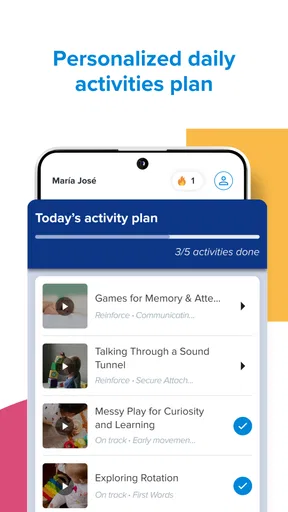
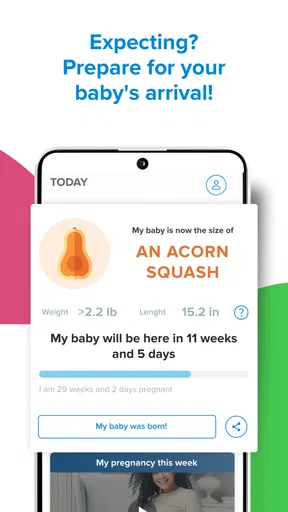
One of the standout features is the personalized activity plan. It’s designed to adapt as your child grows, making quick adjustments based on their progress and new milestones. It’s like having a coach who knows exactly what your baby needs next. No more guessing games!
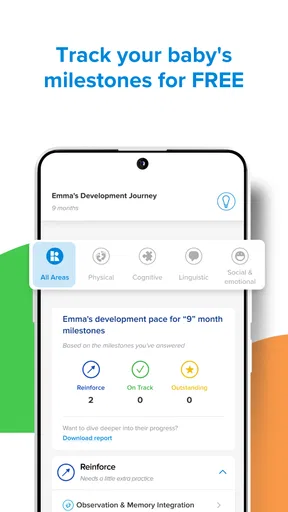
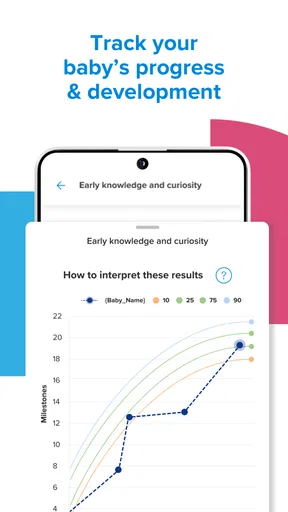
The app also provides a progress tracker, which I found incredibly motivating. Watching those bars fill up as your baby hits new milestones is not only rewarding but also reassuring. It’s a nice little reminder that you’re doing a great job as a parent.
Using progress without turning it into pressure
A tracker is most helpful when it prompts reflection, not comparison. Babies do not all gain skills in a neat sequence, and a progress display should not be treated as a diagnosis or a verdict on a parent’s effort. I’d use it to remember what you have observed and to spot questions you may want to raise with a qualified health professional, rather than to decide on its own that something is wrong or right.
One practical habit is to check progress at a calm moment instead of after every activity. That makes it easier to record meaningful changes without making each play session feel like a test. If an item does not seem to fit your child, consider whether the wording or timing is the issue before assuming the app has made a precise assessment. The tracker can organize your attention, but it cannot replace your own observations or professional advice when you have a developmental concern.
Community and Support
Feeling a bit lost in the sea of parenting advice? Kinedu has got you covered with its community feature. It’s a space where you can connect with other parents, share experiences, and ask questions. The sense of camaraderie is comforting, especially on those days when you need a little extra support.
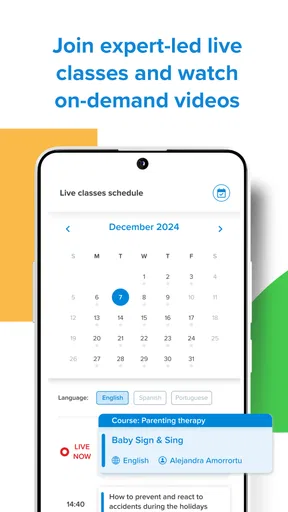
The app also offers live classes and webinars. These sessions dive deeper into specific topics, offering more detailed guidance from child development experts. It’s like attending a parenting workshop without ever leaving your couch. How convenient is that?
How it compares with other parenting tools
Compared with a simple milestone checklist or a general parenting article, this app brings activities, tracking, and learning resources together in one place. That combination is its clearest distinction: rather than only reading about a stage, you can look for something to try and keep an eye on your child’s progress. A basic tracker may be quicker if all you want is to record dates, while a book or a trusted health professional may be a better fit for careful, sustained guidance.
The trade-off is that a broader set of tools can take more attention than a lightweight reference. If you already have a routine and only need occasional answers, a dedicated notes app or a short conversation with your pediatrician may be simpler. If you enjoy guided activity ideas and want classes alongside tracking, the integrated approach is more appealing. I would choose based on whether I will actually use several parts of the app, not on the number of sections it offers.
Things to Keep in Mind
While Kinedu: Baby Development is free to download, some features require a subscription. I know, I know, subscriptions can be a pain. But considering the wealth of information and the personalized touch, it might just be worth the investment. If you’re unsure, there’s a free trial available to help you decide.
One minor hiccup I noticed was the occasional glitch when loading some videos. Nothing too disruptive, but it’s something to be aware of. Hopefully, future updates will smooth this out.
Where the value can fall short
Whether paid access is worthwhile depends on your own pattern of use. If you regularly return for activity ideas, make use of the tracker, and attend the classes, paying for an option that unlocks the material you value may make sense. If you mainly want a few suggestions now and then, the cost could be harder to justify. Since purchase options vary widely, I would compare the exact offer with how often I expect to use it instead of treating the app’s full library as automatically worth the highest price.
There is also a real attention cost. A steady stream of development prompts can feel like one more standard parents are expected to meet, especially on busy days. I’d mute that pressure mentally: use what helps, ignore what does not, and remember that talking, cuddling, and responsive everyday play already matter. The app is best as a source of ideas, not a scorecard for parenting.
Who is likely to get the most from it?
I can see this working well for a first-time parent who wants a gentle structure for choosing play, or for caregivers who share childcare and would benefit from having a common set of ideas to discuss. It may also suit someone who likes visual explanations and wants learning resources alongside a way to note milestones. The app’s audience is broader than one parenting style, but its usefulness depends on whether personalized prompts make daily care easier rather than more complicated.
It is less suited to parents who prefer not to create an account, do not want another app to check, or are looking for medical assessment rather than general developmental activities. It is also not the right purchase if you expect every useful feature to be free or want a very simple record-keeping tool. In those cases, a paper notebook, a basic tracker, or direct guidance from a healthcare professional may be a better match.
Final Thoughts
In a world where parenting can sometimes feel overwhelming, Kinedu: Baby Development comes through as a reassuring ally. Its comprehensive resources and personalized approach make it a standout choice for any parent looking to support their child’s development. From the plethora of activities to the supportive community, it’s an app that truly understands the needs of both parent and child.
So, if you’re on the hunt for a reliable, engaging, and scientifically-backed baby development tool, give Kinedu a try. You might just find it becomes an indispensable part of your parenting toolkit. Happy parenting!
My buy-or-skip verdict
My recommendation is to try the free access first and judge it by a normal week, not by the excitement of setup. If you return to its activities, tracker, and expert-led learning because they genuinely help you choose what to do, then checking a paid option may be worthwhile. If the suggestions go unused or the app makes you feel behind, there is no reason to pay simply because the feature set looks extensive.
Kinedu has reached over 5 million installs, and it was released in March 2018. The current version is 2.28.0 and requires Android 6.0 or later. Those details make it accessible to many Android users, though the overall choice still comes down to whether its particular mix of guided play and tracking fits your family. For me, it is most convincing as a flexible idea bank with optional structure—not a substitute for your judgment, your child’s cues, or professional care.
Privacy and Permissions
See what permissions an app requests and how it handles your data.
- Photos/Media/Files
- read the contents of your USB storage, modify or delete the contents of your USB storage
- Storage
- read the contents of your USB storage, modify or delete the contents of your USB storage
- Wi-Fi connection information
- view Wi-Fi connections
- Other
- view network connections, disable your screen lock, full network access, run at startup, reorder running apps, prevent device from sleeping
Verdict
Strengths of Kinedu: Baby Development
- Comprehensive daily activity suggestions.
- Supports multiple child profiles.
- Includes expert developmental advice.
- Customizable milestone tracking.
- User-friendly interface.
Limitations of Kinedu: Baby Development
- Requires a stable internet connection.
- Limited features on the free version.
- Some videos may load slowly.
- Content can feel repetitive over time.
- In-app purchases can add up.
Similar Picks in This Category
View All
Family Space
Motorola Mobility LLC.3.9

شرطة الأطفال - مكالمة وهمية
Oub Apps4.1

Findmykids: Parental Control
LETEM LTD4.6

Pregnancy + | Tracker App
Philips Electronics UK Limited4.8

Policía de niños - para padres
Kids police4.7

Pregnancy App
Amila4.9
Frequently Asked Questions
What is Kinedu: Baby Development, and how does it work?
Kinedu is an app designed to support parents in nurturing their child's developmental milestones from 0 to 6 years. It provides personalized daily activity plans, expert-led videos, and progress tracking. The app adapts to your child’s developmental needs, offering activities that stimulate cognitive, social, emotional, and physical growth.
Is Kinedu: Baby Development free to use, or are there any subscription fees?
Kinedu offers a free version with limited access to activities and features. However, for comprehensive access, users can opt for a subscription plan. The premium version unlocks a wider range of activities, expert insights, and personalized plans, ensuring a more tailored developmental experience for your child.
Can I use Kinedu: Baby Development for more than one child?
Yes, Kinedu allows you to add multiple children to your account. You can create separate profiles for each child, ensuring that the activities and developmental plans are customized according to their individual age and developmental stage, providing a personalized experience for each child.
How does Kinedu ensure the safety and privacy of user data?
Kinedu takes user privacy seriously by implementing robust security measures to protect your data. The app complies with international privacy regulations and does not share personal information with third parties without consent. Users can manage their privacy settings to control information sharing within the app.
What kind of expert support is available through Kinedu: Baby Development?
Kinedu offers access to a range of expert-led content created by child development specialists. This includes videos and articles covering various developmental topics. Additionally, the app provides personalized guidance based on developmental milestones, helping parents understand and support their child’s growth effectively.
